
 Kompass
DWA
GPU-accelerated Dynamic Window Approach.
DWA is a classic local planning method developed in the 90s.[1] It is a sampling-based controller that generates a set of constant-velocity trajectories within a “Dynamic Window” of reachable velocities.
Kompass supercharges this algorithm using SYCL-based hardware acceleration, allowing it to sample and evaluate thousands of candidate trajectories in parallel on Nvidia, AMD, or Intel GPUs. This enables high-frequency control loops even in complex, dynamic environments with dense obstacle fields.
It is highly effective for differential drive and omnidirectional robots.
How it Works
The algorithm operates in a three-step pipeline at every control cycle:
1. Search Space - Compute Dynamic Window.
Calculate the range of reachable linear and angular velocities (\(v, \omega\)) for the next time step, limited by the robot’s maximum acceleration and current speed.2. Rollout - Sample Trajectories.
Generate a set of candidate trajectories by sampling velocity pairs within the dynamic window and simulating the robot’s motion forward in time.3. Evaluate - Score & Select.
Discard trajectories that collide with obstacles (using FCL). Score the remaining valid paths based on distance to goal, path alignment, and smoothness.
Supported Sensory Inputs
DWA requires spatial data to perform collision checking during the rollout phase.
LaserScan
PointCloud
OccupancyGrid
Parameters and Default Values
Name |
Type |
Default |
Description |
|---|---|---|---|
control_time_step |
|
|
Time interval between control actions (sec). Must be between |
prediction_horizon |
|
|
Duration over which predictions are made (sec). Must be between |
control_horizon |
|
|
Duration over which control actions are planned (sec). Must be between |
max_linear_samples |
|
|
Maximum number of linear control samples. Must be between |
max_angular_samples |
|
|
Maximum number of angular control samples. Must be between |
sensor_position_to_robot |
|
|
Position of the sensor relative to the robot in 3D space (x, y, z) coordinates. |
sensor_rotation_to_robot |
|
|
Orientation of the sensor relative to the robot as a quaternion (x, y, z, w). |
octree_resolution |
|
|
Resolution of the Octree used for collision checking. Must be between |
costs_weights |
|
see defaults |
Weights for trajectory cost evaluation. |
max_num_threads |
|
|
Maximum number of threads used when running the controller. Must be between |
Note
All the previous parameters can be configured when using DWA algorithm directly in your Python recipe or using a config file (as shown in the usage example)
Usage Example
DWA can be activated by setting the algorithm property in the Controller configuration.
from kompass.components import Controller, ControllerConfig
from kompass.robot import (
    AngularCtrlLimits,
    LinearCtrlLimits,
    RobotCtrlLimits,
    RobotGeometry,
    RobotType,
    RobotConfig
)
from kompass.control import ControllersID

# Setup your robot configuration
my_robot = RobotConfig(
    model_type=RobotType.ACKERMANN,
    geometry_type=RobotGeometry.Type.BOX,
    geometry_params=np.array([0.3, 0.3, 0.3]),
    ctrl_vx_limits=LinearCtrlLimits(max_vel=0.2, max_acc=1.5, max_decel=2.5),
    ctrl_omega_limits=AngularCtrlLimits(
        max_vel=0.4, max_acc=2.0, max_decel=2.0, max_steer=np.pi / 3)
)

# Set DWA algorithm using the config class
controller_config = ControllerConfig(algorithm="DWA")

# Set YAML config file
config_file = "my_config.yaml"

controller = Controller(component_name="my_controller",
                        config=controller_config,
                        config_file=config_file)

# algorithm can also be set using a property
controller.algorithm = ControllersID.DWA      # or "DWA"
my_controller:
  # Component config parameters
  loop_rate: 10.0
  control_time_step: 0.1
  prediction_horizon: 4.0
  ctrl_publish_type: 'Array'

  # Algorithm parameters under the algorithm name
  DWA:
    control_horizon: 0.6
    octree_resolution: 0.1
    max_linear_samples: 20
    max_angular_samples: 20
    max_num_threads: 3
    costs_weights:
      goal_distance_weight: 1.0
      reference_path_distance_weight: 1.5
      obstacles_distance_weight: 2.0
      smoothness_weight: 1.0
      jerk_weight: 0.0
Trajectory Samples Generation
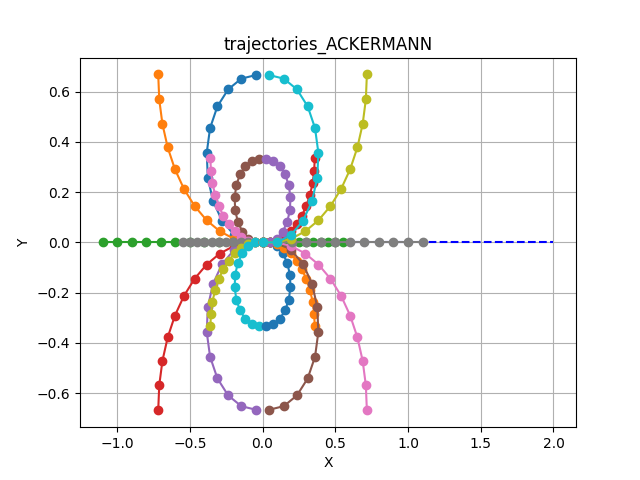
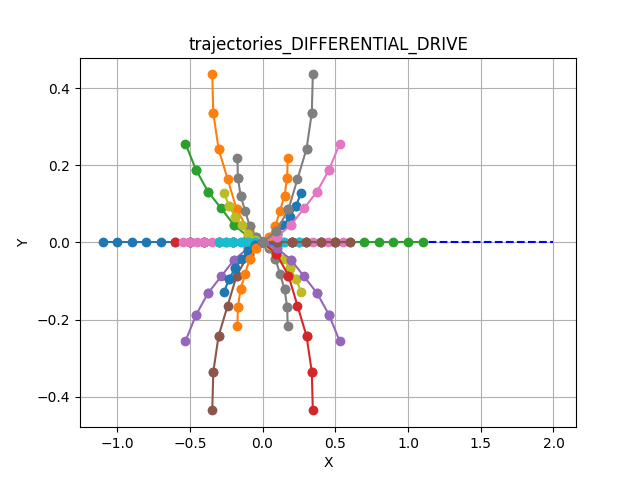
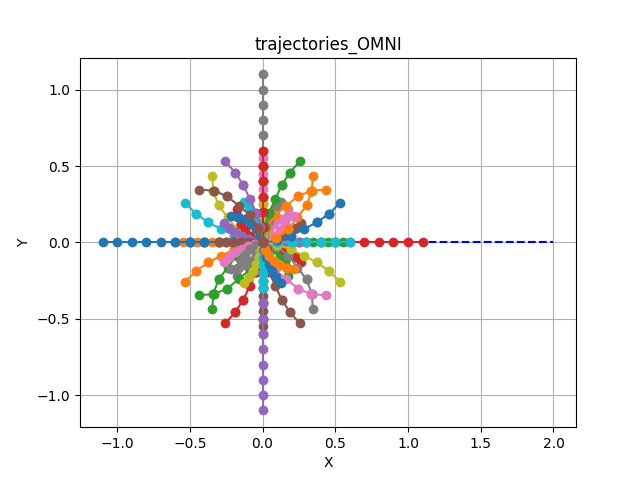
Trajectory samples are generated using a constant velocity generator for each velocity value within the reachable range to generate the configured maximum number of samples (see max_linear_samples and max_angular_samples in the config parameters).
The shape of the sampled trajectories depends heavily on the robot’s kinematic model:
Car-Like Motion
Note the limited curvature constraints typical of car-like steering.
Tank/Diff Drive
Includes rotation-in-place (if configured) and smooth arcs.
Holonomic Motion
Includes lateral (sideways) movement samples.
Rotate-Then-Move
To ensure natural movement for Differential and Omni robots, Kompass implements a Rotate-Then-Move policy. Simultaneous rotation and high-speed linear translation is restricted to prevent erratic behavior.
Best Trajectory Selection
A collision-free admissibility criteria is implemented within the trajectory samples generator using FCL to check the collision between the simulated robot state and the reference sensor input.
Once admissible trajectories are sampled, the Best Trajectory is selected by minimizing a weighted cost function:
You can tune these weights (costs_weights) to change the robot’s behavior (e.g., sticking closer to the path vs. prioritizing obstacle clearance).