

Kompass Kompass Kompass
  • Automatika Robotics
/

Overview

  • Why Kompass?
  • Installation
  • Quick Start
    • Quick Start: Webots Simulator
    • Quick Start: Gazebo Simulator
  • Kompass CLI

Tutorials

  • Basic Navigation Patterns
    • Hello World: Point Navigation Recipe
    • Path Recording & Replay
    • Automated Motion Testing
    • Following a moving target using RGB Image
    • Vision Tracking Using Depth Information
    • Configuring Components Your Way
  • Robust & Event-Driven Navigation
    • Fallbacks, Events & Actions: Design Guide
    • Making the system robust with Fallbacks
    • Events For Cross-Component Healing
    • Events for External Reflexes
    • Complex Events: Logic Gates & Fusion
    • Context-Aware Actions

Navigation Components

  • Navigation Components Overview
  • Robot Configuration
  • Planner
  • Controller
  • Drive Manager
  • Local Mapper
  • Map Server
  • Motion Server
  • Global Mapping & Localization

Integrations

  • OMPL (Open Motion Planning Library)
  • FCL (Flexible Collision Library)

Advanced

  • Design Concepts
  • Advanced Configurations
    • Inputs and Outputs
    • Topic QoS Configuration
  • Control Algorithms
    • Pure Pursuit
    • DWA
    • Stanley Steering
    • DVZ
    • Vision Follower (RGB)
    • Vision Follower (RGB-Depth)
    • Trajectory Cost Evaluation
  • Supported ROS2 Messages
  • Benchmarking Results

References

  • API Reference
    • kompass
      • kompass.components
        • kompass.components.defaults
      • kompass.callbacks
      • kompass.data_types
      • kompass.launcher
      • kompass.ros
      • kompass.config
      • kompass.actions

On this page

  • Core Components
  • Sensing Requirements
    • Minimum Requirements
    • Enhanced Features
  1. Kompass /
  2. Navigation Components Overview
View as Markdown Open in ChatGPT Open in Claude

Navigation Components Overview

The modular building blocks of Kompass

Kompass is designed to make autonomous navigation easy to set up, flexible to customize, and powerful enough for robots working in changing real-world conditions. Think of it as a collection of building blocks: you choose the ones you need, configure them for your robot, and you’re good to go!
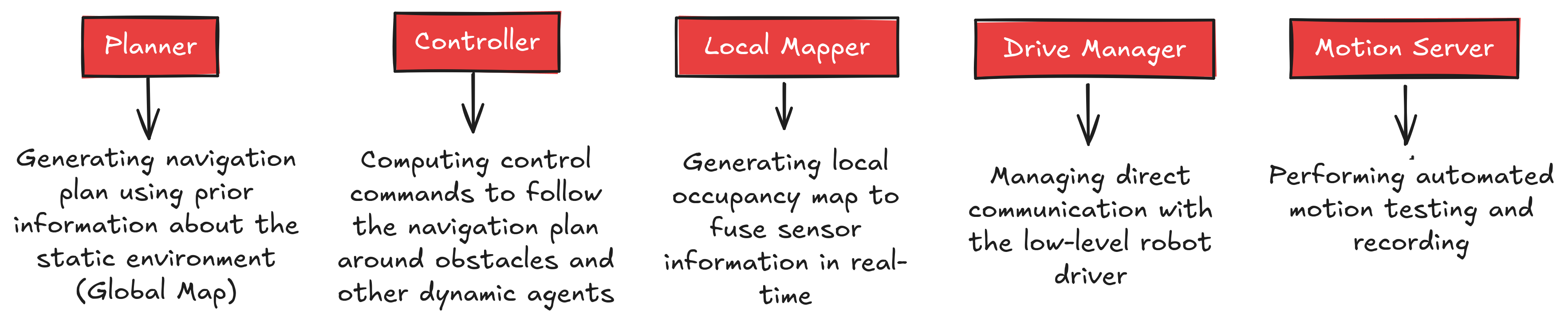
Kompass Components and Main Tasks

Kompass Components and Main Tasks

Each component runs as a ROS2 lifecycle node and communicates with the other components using ROS2 topics, services or action servers:
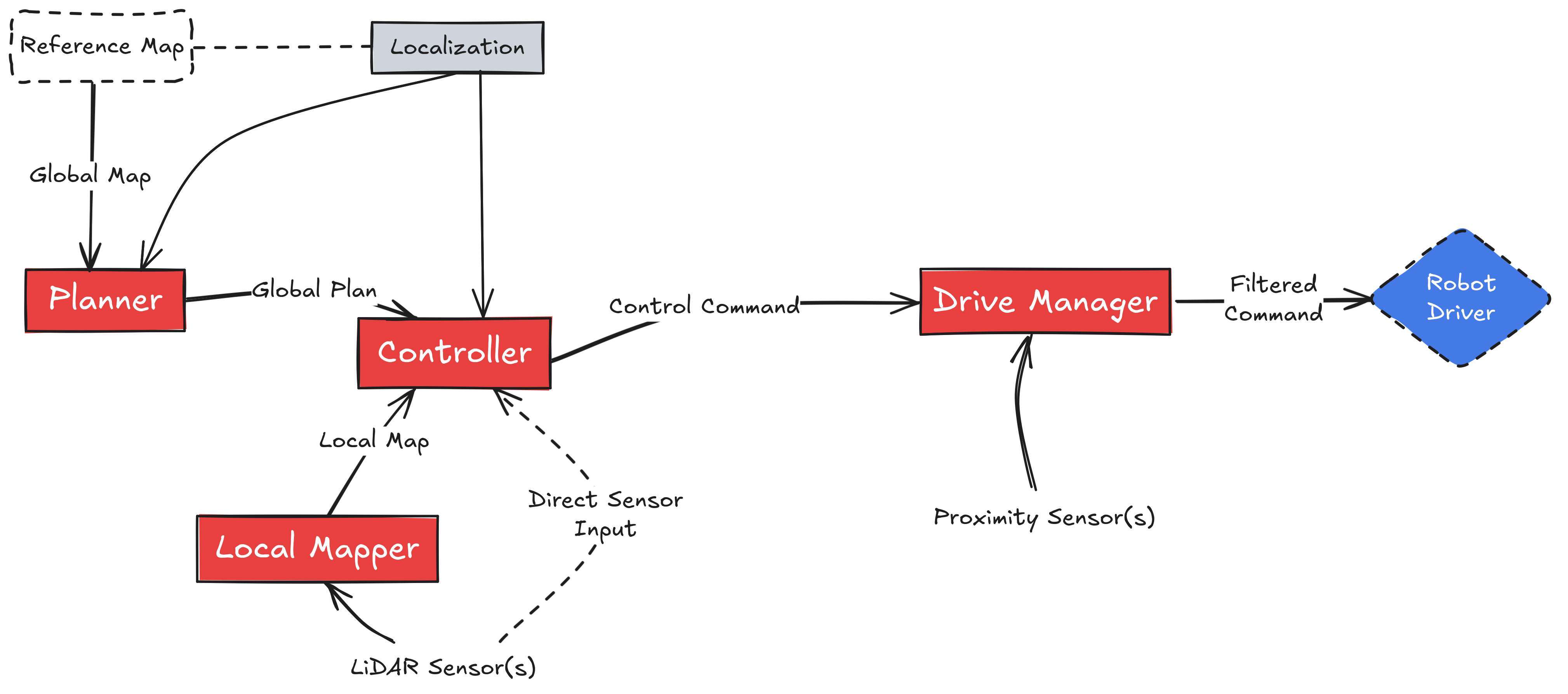
Kompass Full System
Kompass Full System

System Diagram for Point Navigation

In the following, we give a quick tour of the core navigation components, what each one does, and what sensors you actually need to get Kompass up and running.


Core Components

Global Planner

Long-range Path finding Computes the optimal route from the robot’s current pose to a goal.

Planner
Controller

Local Motion Control Generates precise motion commands.

Controller
Local Mapper

Real-time Environment Context Builds a high-speed occupancy representation of the immediate surroundings.

Local Mapper
Drive Manager

Hardware Interface & Safety The final gateway to the robot’s actuation.

Drive Manager
Map Server

Global Data Management Serves static 2D/3D map files to the rest of the stack.

Map Server
Motion Server

Calibration & recording Runs automated tests and performs motion recording for calibration and validation

Map Server

Sensing Requirements

Kompass scales with your hardware, from minimal lab setups to sensor-heavy industrial platforms.

Minimum Requirements

To get the baseline navigation running, you need:

  • Odometry: Wheel encoders, IMU, or Visual Odometry.

  • Obstacle Detection: 2D LiDAR or a Depth Camera.

  • Global Pose: A localization source (e.g., AMCL, SLAM, or GPS).

Enhanced Features

Unlock advanced capabilities with additional sensors:

  • Depth Cameras: Enable 3D obstacle avoidance and robust RGB-D Vision Following.

  • 3D LiDAR: High-fidelity perception in complex, multi-level environments.

  • RGB Cameras: Enable semantic understanding and object-based navigation.

  • GPS/UWB: Precision localization for outdoor or large-scale indoor deployment.

Previous
Context-Aware Actions
Next
Robot Configuration

2026, Automatika Robotics

Made with Sphinx and Shibuya theme.